

This option allows you to program a lockout code required to access the Programmer menu.
Note: Store the lockout code in a secure location. Initializing the panel does not clear the code. If the code is lost, return the panel to DMP for repair.
-
Press 6653 (PROG), then CMD at the keypad to enter the PROGRAMMER menu.
-
Press CMD until you see SET LOCKOUT CODE, then press any select key or area.
|
Keypad Display |
Description |
|---|---|
|
SET LOCKOUT CODE |
Enter a 3- to 5-digit code. The code can be changed at any time. Leading zeroes are not required when entering the code. You can cancel a lockout code by entering 00000. Note: Do not set a lockout code higher than 65535. |
Before You Begin
-
Verify the panel is connected to network
-
Log in to Dealer Admin.
-
Go to Customers, then select the System Name.
-
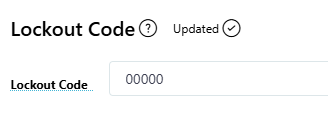
Go to Programming > Lockout Code.
-
Enter a 3- to 5-digit code. The code can be changed at any time. Leading zeroes are not required when entering the code. You can cancel a lockout code by entering 00000.
Note: Do not set a lockout code higher than 65535.
-
When you are finished, select one of the following options:
-
-
If you are finished with all programming — Select Send All Changes at the top of the screen. This sends all programming changes to the panel.
-
If you are finished programming the Lockout Code only — Select the More icon

-